
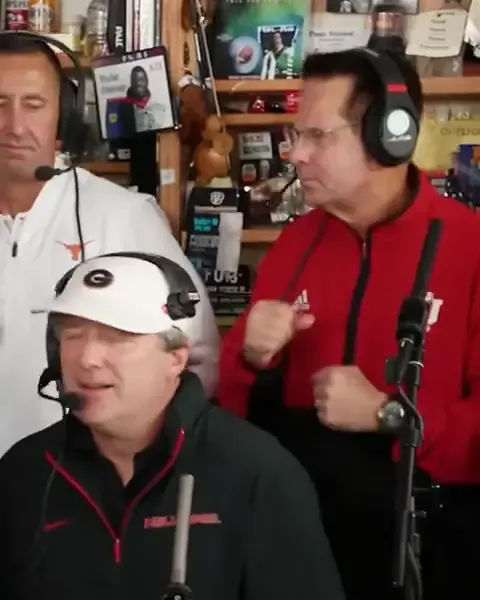
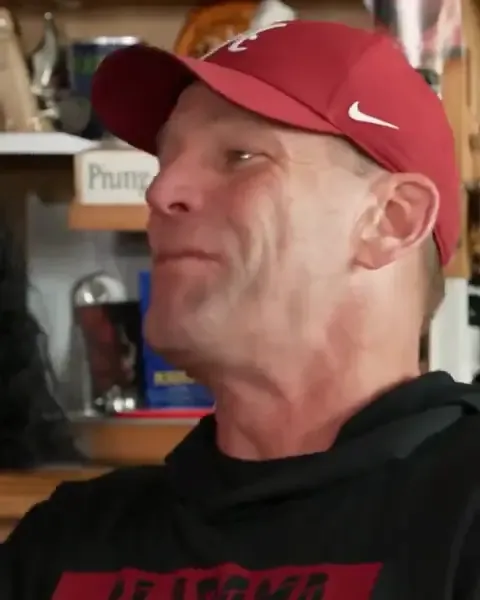
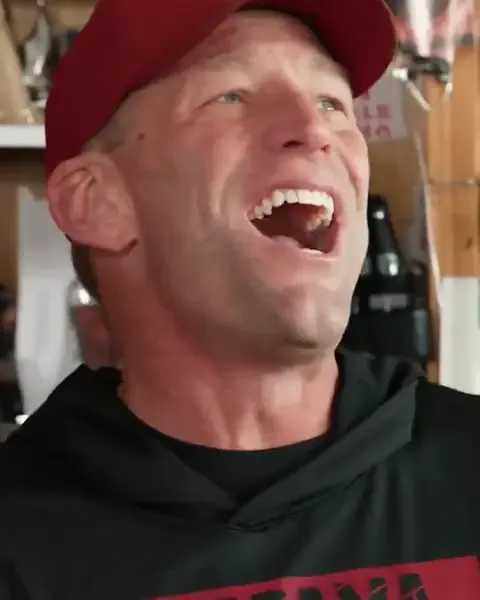
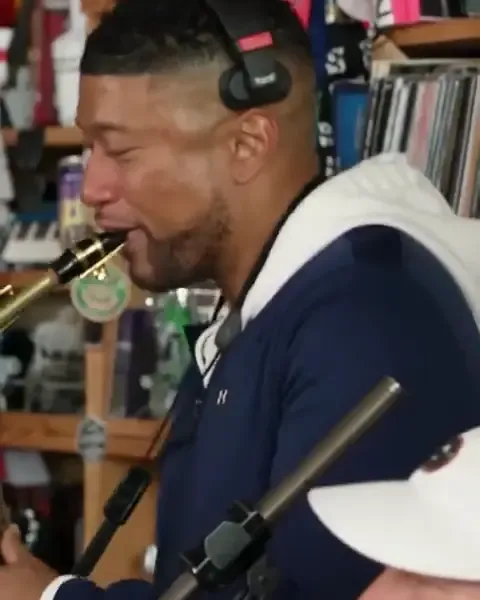
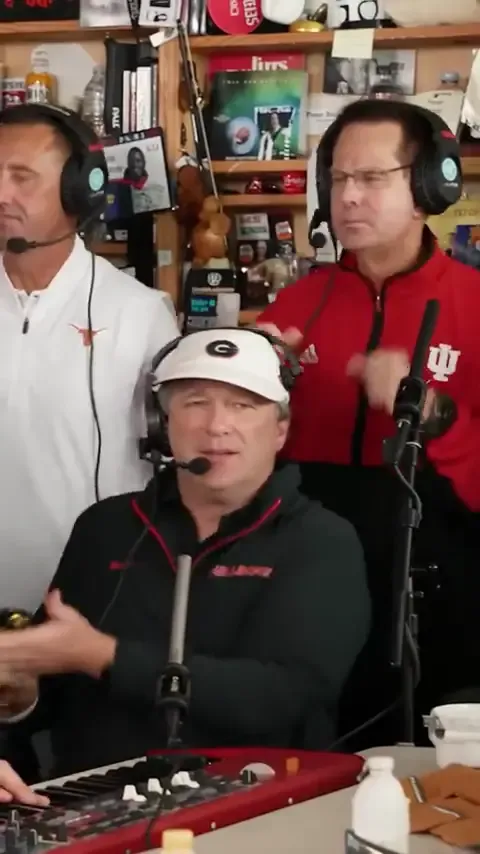
The Outstanding Tiny Desk AI video puts your own people into Charlie Wilson's band at NPR's Tiny Desk. Your crew is squeezed behind the cluttered little desk, one of you laughs up close, and somebody takes the sax solo at the end. The trend started with college football coaches after a bad Saturday, but the version that does best in a group chat is the one where everybody knows the faces. This guide goes through it in order: who plays which part, which photos to take, how to make the video and how to post it.
What you need
- Photos of up to five adults who said yes, you included. One group photo of everyone works, and so does one photo per person.
- A phone or a computer with a browser. There is no app to install and no Outstanding Tiny Desk AI template to download or edit.
- A few minutes. Most videos are ready in 4 to 8 minutes, and you don't have to wait on the page.
Step 1. Cast the band
The clip has five parts, and who goes where is most of the joke. Before anyone takes a photo, decide who plays what.
- The close-up. The camera cuts to this person mouthing along in profile, then they turn, grin down the lens and laugh with their head thrown back. It is the shot people screenshot, so give it to whoever the video is about: the friend who had the worst week, the birthday person, the one everybody wants to roast. This is the one part you have to fill, and it is yours.
- The lead singer sits at the desk mic behind the red keyboard, in the middle of the wide shot. It suits the loudest friend, the boss or the team captain.
- The sax gets the last shot of the clip, eyes shut, deep in a solo. Because it comes last it is the punchline, so save it for a surprise: the quietest coworker, the league commissioner, a grandparent.
- The two backup singers stand at the back in headsets and punch the air on every "Outstanding". Put the people who will laugh hardest at the result here.
You don't need all five. Fill the close-up and leave the rest empty if you like: an empty part stays as it is in the original clip, so a two-person or three-person version works fine. Stuck on who to cast? These Outstanding Tiny Desk meme ideas give ten crews and who gets the laugh and the sax in each.
Step 2. Take the photos
One group photo or a photo each
One group photo is the quickest way. Everyone stands in a row, one photo covers the whole band, and the band is cast from the left in this order: the close-up, the lead singer, the sax, backup singer 1 and backup singer 2. Line up in that order before you take it, with the person who gets the laugh at the far left.
A photo each takes a little longer but lets you pick every part by hand. It is also the way to go when the band is not in the same room, because everyone can send their own photo.

What makes a good photo
The AI can only copy what it can see, so the photo decides how much the band looks like you.
- Faces sharp and turned to the camera. A side view, sunglasses or a cap pulled low cost the likeness.
- Waist-up or more. Everyone keeps the clothes from their own photo, so the outfit carries a lot of the look. A work polo, a team hoodie or a wedding suit in a soul band is half the fun, so don't change for the photo.
- Good light on the face. Face a window or a lamp. Daylight beats a dim bar.
- Straight from the camera. Beauty filters smooth out the features the AI needs.
- Nobody hidden in a group photo. Every face should be clear and big enough to see, with no one half behind someone else.
Leave out children, celebrities, players, coaches and anyone who hasn't agreed. The viral versions used real coaches, but here every photo has to be you or an adult who said yes.
Step 3. Make the video
On the Outstanding Tiny Desk AI video generator:
- Choose One group photo or A photo each, and add your photos.
- Tick the box to confirm that everyone pictured is an adult who agreed.
- Press Make our Outstanding Tiny Desk.
The office, the gear and the four cuts are already in the scene, so there is nothing to type and nothing to set up. You can close the page while it renders. The video waits in My videos, and we email you when it is done. It comes out vertical, ready for TikTok, Reels or Shorts, with no watermark from us. If a render fails, the video goes back to your account so you can try again.
Make your Outstanding Tiny Desk AI videoStep 4. Post it
- Switch on the AI label. TikTok calls it AI-generated content, and Instagram and YouTube have their own. Nobody should think your office really played NPR.
- Say it is a parody. The first All-Loss Tiny Desk post said so in its caption and still went past 2.3 million plays.
- Tag the whole band. People share the video they are in, and the people who know them are the ones who laugh.
- Post it the day after. The trend runs on bad weeks. A lost game, a missed deadline or a long family weekend is when the band makes the most sense.
A few captions to start from: "Our office's all-deadline Tiny Desk concert", "Last place in the fantasy league, live at the Tiny Desk", "The group chat finally formed a band".
If a face doesn't look right
It is almost always the photo, and it is usually one of these:
- The face is small or soft. Take a closer photo, from the waist up, in focus.
- The face is in shadow. Turn toward the light and take it again.
- The photo has a filter. Use the original from the camera roll.
- A face in the group photo is too small. Switch to A photo each, so every person gets a photo of their own.
The close-up shows a face the most, so that part deserves your best photo.
Questions about the Outstanding Tiny Desk AI video
Is there an Outstanding Tiny Desk AI template I need?
No. People call it a template because every version uses the same scene, the same desk and the same four cuts. Here that scene is already set up, so all you add is photos. There is nothing to download and no editor to open. The Outstanding Tiny Desk AI template, part by part shows what stays and what gets swapped.
Can I make it with just my own photo?
Yes. Add yours for the close-up and leave the other parts empty. They stay as they are in the original clip.
Can I make it on my phone?
Yes. It works in your phone's browser, from adding the photos to downloading the finished video and posting it.
Is it an official NPR Tiny Desk video?
No. It is a fan-made parody, and this site has no connection to NPR, the Tiny Desk series, Charlie Wilson or The Gap Band. Every video made here is made by AI, so label it that way when you share it.